What does it mean to be in the Claude directory?
How do I connect EcoCheck to Claude?
What can I hand over to Claude?
Does the company stay in control of the AI?
What about ChatGPT and the AI Skills?
Frequently asked questions
Does the EcoCheck connector for Claude cost extra?
What is the difference between Community and Verified?
I already added EcoCheck by URL. Do I need to reconnect?
Is company data used to train AI models?
EcoCheck Is Now in the Claude Connectors Directory
On 9 October 2026, EcoCheck became available in the Claude Connectors directory (claude.ai/directory/ecocheck). Companies using Claude can now search for "EcoCheck", click Connect and sign in to record emissions data, view GHG inventory reports and compute CBAM embedded emissions right inside the conversation, with no connection URL to paste and nothing to configure. The ChatGPT version has been submitted and is awaiting OpenAI review.
What does it mean to be in the Claude directory?
The Connectors directory is where Claude users (web, desktop, mobile, Claude Code) find and connect external software. Every connector in the directory has gone through Anthropic's review of security, sign-in and tool descriptions. EcoCheck was approved in the Community tier (automated review) and has asked Anthropic to be considered for the Verified tier.
Until now, using EcoCheck in Claude meant adding a "custom connector" with the address https://ecocheck.ai/mcp/account. EcoCheck now sits in the directory next to the other business tools, so connecting takes a few clicks.
How do I connect EcoCheck to Claude?
- Open EcoCheck in the Claude Connectors directory, or in Claude go to Settings › Connectors › Browse connectors and search for "EcoCheck".
- Click Connect. Claude opens the EcoCheck sign-in page; sign in with your account. Claude never sees your password.
- In a new conversation, give it a task in plain language, for example: "What are our 2026 emissions by scope, and which source is the largest?"
No EcoCheck account yet? Request a trial, or use the public tools that need no sign-in, such as the CBAM cost calculator and the inventory obligation check. Step-by-step instructions for each app are in the connector documentation.
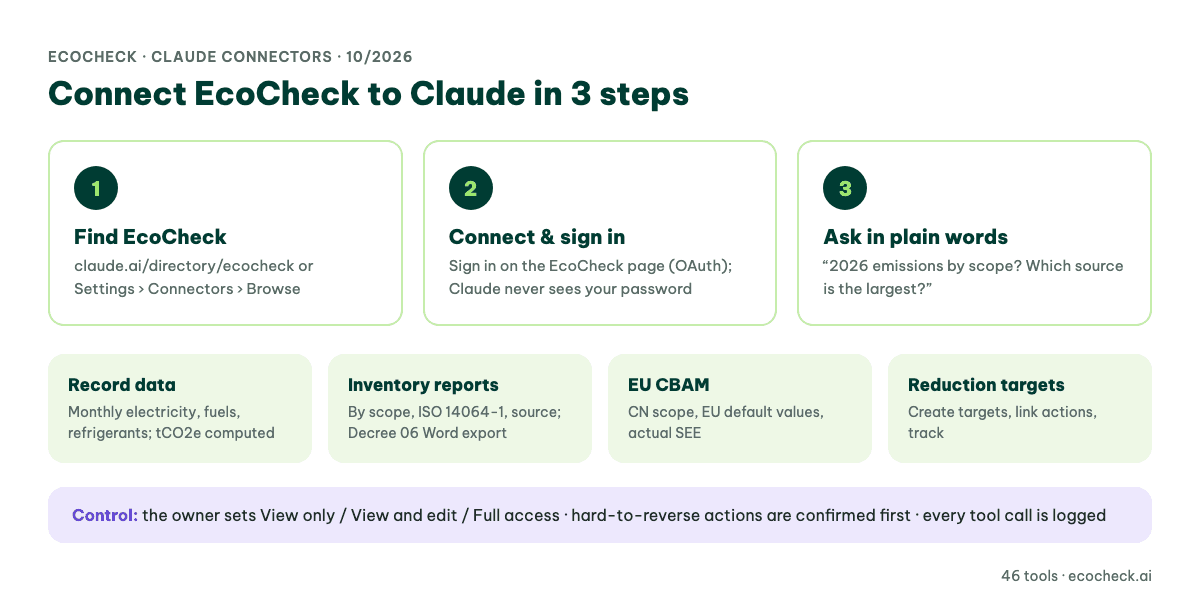
Figure 1: Connecting EcoCheck to Claude in 3 steps and the jobs you can hand to AI
What can I hand over to Claude?
The EcoCheck connector has 46 tools, each doing exactly one thing. You do not need to remember their names: Claude picks the right one from your request. The main jobs:
- Record activity data: monthly electricity, fuels, refrigerants and purchased goods for each facility. EcoCheck picks the emission factor, converts units and computes tCO2e.
- Inventory reports: emissions by scope, by the six ISO 14064-1 categories, by gas, source and month; the largest sources; Word reports in the ISO 14064-1 or Vietnam Decree 06/2022 template.
- EU CBAM: check whether a CN code is covered, look up EU default values, build the data and compute actual specific embedded emissions (SEE) for steel, aluminium, cement and fertilisers.
- Reduction targets: create targets, link actions and track progress.
In a test with the demo account, the question "What are our 2026 emissions by scope, and which source is the largest?" was answered in about 10 seconds, with a Scope 1 / Scope 2 table and the largest source, read directly from the EcoCheck inventory.
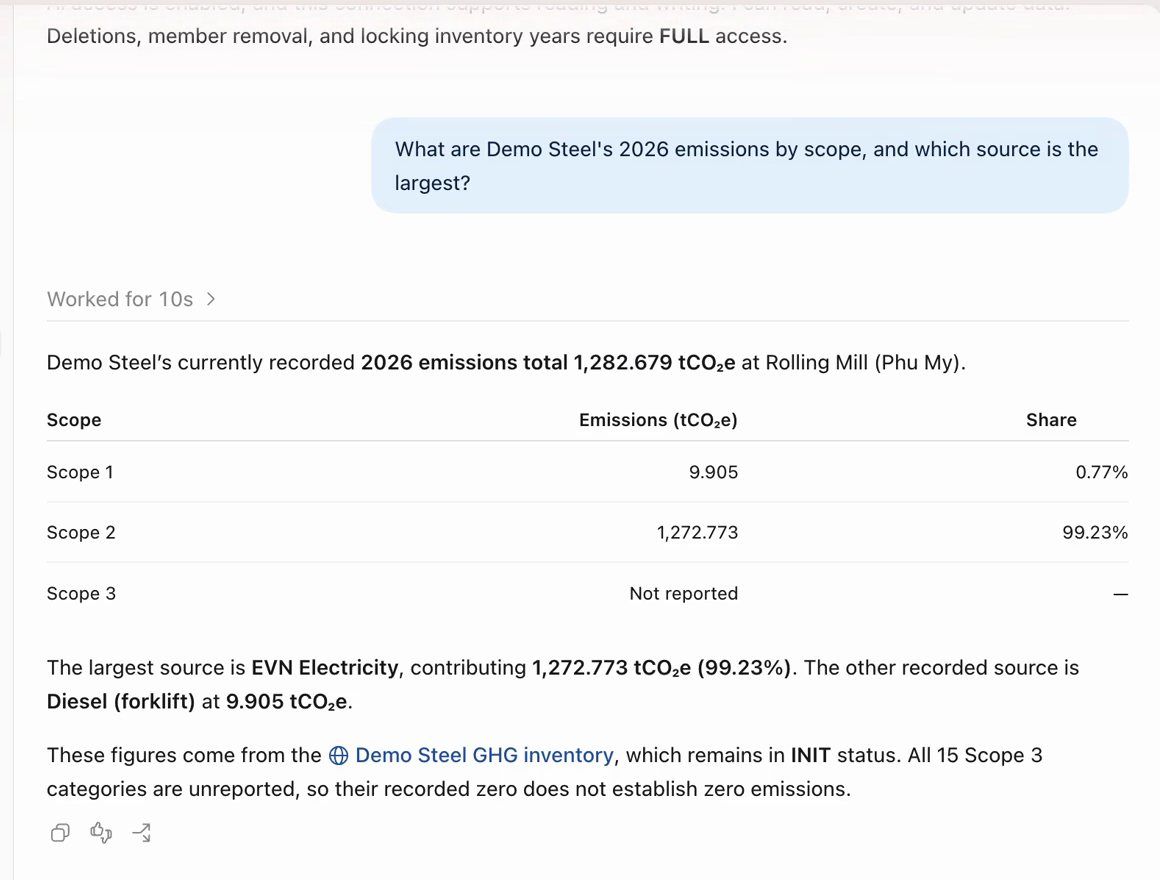
An AI assistant answering 2026 emissions by scope, read directly from the EcoCheck inventory (demo account)
Does the company stay in control of the AI?
Yes. The directory connector uses EcoCheck's own permission model:
- Standard OAuth sign-in: the AI never holds your password; access tokens expire after one hour and refresh automatically.
- The workspace owner sets each member's AI level: View only (default), View and edit, or Full access. The AI never has more rights than the user.
- Hard-to-reverse actions are clearly flagged (locking an inventory year, finalising a CBAM report, sending an invitation), so Claude asks you before running them. Deleting data always needs Full access and an explicit confirmation.
- Audit log: every tool call is recorded (who, which tool, when, allowed or refused), and the owner can disconnect AI access instantly.
See the connector privacy policy and the connector documentation.
What about ChatGPT and the AI Skills?
- ChatGPT: the EcoCheck app (with two expert skills) has been submitted to the ChatGPT directory and is awaiting OpenAI review. Meanwhile you can still add the address
https://ecocheck.ai/mcp/accountas described in the documentation. - CBAM and ISO 14064 AI Skills: the expert knowledge pack (official CBAM default values, SEE method, ISO 14064-1 report checklist, verification pack) is packaged as a Claude plugin and submitted to the Plugins directory. Claude Code users can install it from GitHub today, or download it for free.
We will update this article as these versions are approved. See everything EcoCheck does with AI on the EcoCheck in ChatGPT and Claude page.
Frequently asked questions
Does the EcoCheck connector for Claude cost extra?
AI access is included in your EcoCheck account at no extra charge. You pay Anthropic for Claude under your own plan.
What is the difference between Community and Verified?
Community connectors have passed Anthropic's automated review. Verified connectors have also been reviewed manually by Anthropic. EcoCheck has requested a Verified review and will update this page when there is a decision.
I already added EcoCheck by URL. Do I need to reconnect?
No. Your existing connection keeps working with the same server and the same 46 tools. You can remove it and connect again from the directory if you prefer.
Is company data used to train AI models?
EcoCheck does not use connector data to train AI models and does not sell data. How Anthropic stores conversations is governed by its policies and your Claude account settings.
Doanh nghiệp bạn thuộc diện phải kiểm kê khí nhà kính?
EcoCheck tự động tính Scope 1/2/3, xuất báo cáo chuẩn NĐ06/TT38 chỉ 1-click — tiết kiệm 90% thời gian so với Excel.
Bài viết mới nhất



![Phương pháp Kiểm kê Khí nhà kính: GHG Protocol & ISO 14064 [2026]](https://cms.ecocheck.ai/uploads/Cac_phuong_phap_va_tieu_chuan_kiem_ke_khi_nha_kinh_pho_bien_e645f7df80.png)