Using EcoCheck inside Claude: what can it do?
Why work inside Claude?
How companies stay in control
Get started in 2 minutes
About EcoCheck and Claude Startups
FAQ
Is EcoCheck a partner of Anthropic?
Does using EcoCheck in Claude cost extra?
Does it work with ChatGPT?
What if we don't use AI?
GHG Inventory and CBAM Inside Claude with EcoCheck
Companies can now run their greenhouse-gas inventory, prepare Vietnam Decree 06 reports and get CBAM data ready inside a conversation with Claude, working on their own data in EcoCheck. This post covers what you can hand over to Claude, how companies stay in control and how to start in 2 minutes.
Using EcoCheck inside Claude: what can it do?
EcoCheck has been listed in Claude's Connectors directory since 9 October 2026. The connection uses the Model Context Protocol (MCP), an open standard introduced by Anthropic. You don't need to know anything about it: click Connect, sign in with your EcoCheck account, then message Claude the way you would message a colleague.
The connector has 46 tools. Each does one job, and Claude picks the right one from your request. The jobs companies hand over most often:
- Record monthly activity data: electricity, diesel, LPG, refrigerants and purchased goods for each facility. EcoCheck picks the emission factor, converts units and calculates tCO2e. In internal tests, recording a full month for one plant took about 46 seconds.
- Inventory reports: totals by Scope 1, 2 and 3, by the six ISO 14064-1 categories, by gas and by source; the largest sources; Word reports in Vietnam's Decree 06/2022 Form 06 (as amended by Decree 119/2025) or ISO 14064-1 format.
- EU CBAM: check whether a CN code is in scope, look up official EU default values, calculate actual specific embedded emissions (SEE) for steel, aluminium, cement and fertilisers, and estimate the certificate cost your EU customer will pay.
- Scope 3 and reduction: track supplier data, set reduction targets, attach measures and follow progress.
For example, an environmental engineer can write: "Record 182,400 kWh of electricity for the Binh Duong plant in September, then show Q3 emissions by scope and the largest source." Claude records the data in EcoCheck, applies the current Vietnam grid factor and answers with a short table. The new data appears on the EcoCheck web app straight away, so the whole team works from one source.
Why work inside Claude?
- No new software to learn. People ask in everyday language; Claude handles the clicks.
- Faster on repetitive work. Monthly data entry, invoice checks and roll-ups by facility take the most hours in any inventory.
- Numbers stay audit-ready. The AI does not "guess" the maths: EcoCheck calculates with factors from official sources (Vietnam's MONRE, IPCC, EU CBAM, DESNZ, EPA and others), each with its source and edition for verification.
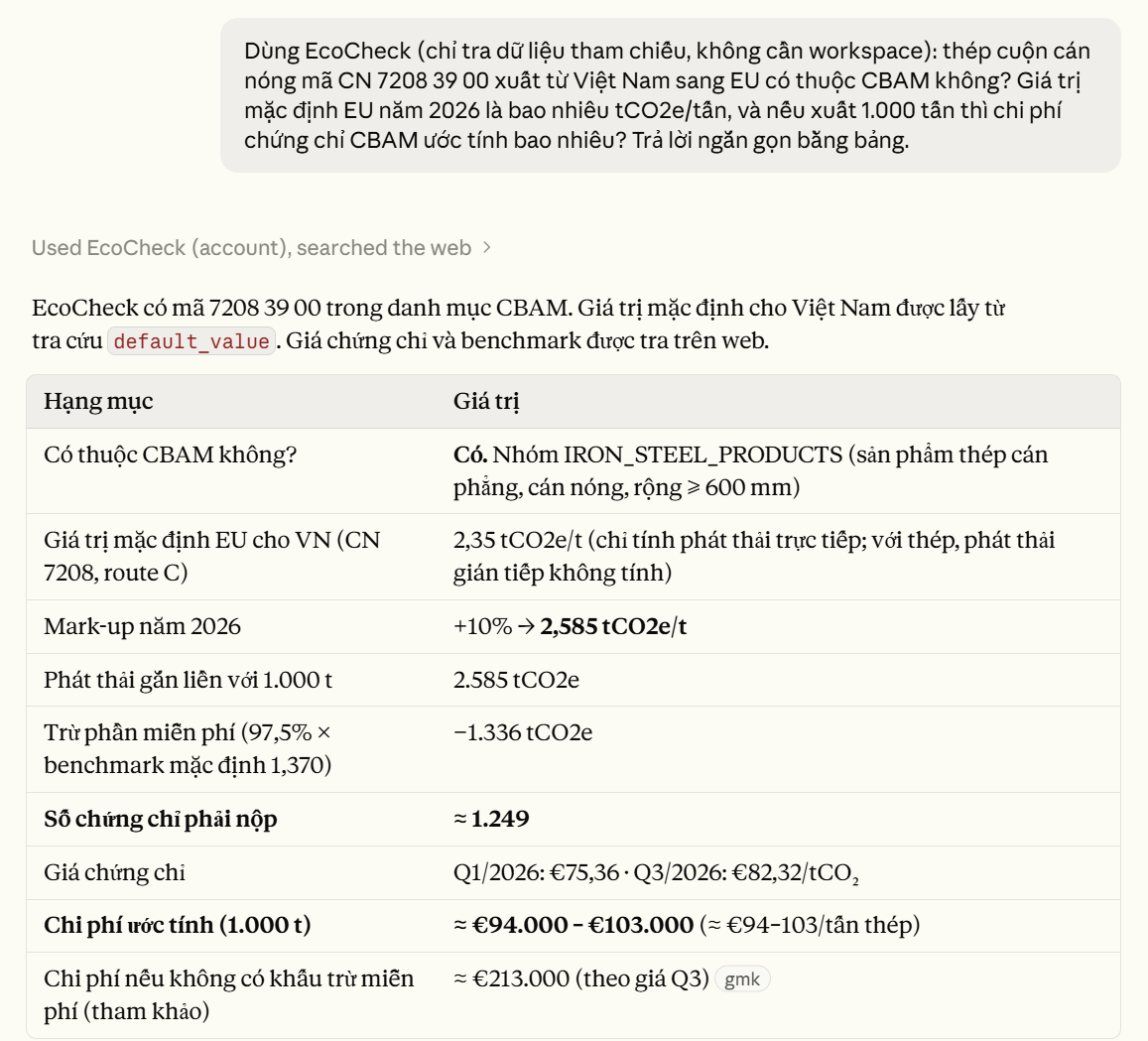
Claude uses EcoCheck to check CN code 7208 39 00 and the EU CBAM default value, then estimates the certificate cost for 1,000 t of steel
How companies stay in control
- Standard OAuth sign-in: Claude never sees your password; access expires automatically and can be revoked at any time.
- The workspace owner sets each member's AI level: view only, view and edit, or full. The AI never has more rights than the person using it.
- Hard-to-undo actions always ask first, such as finalising a CBAM report or locking an inventory year. Deleting data needs full rights and explicit confirmation.
- Every AI tool call is logged: who, what, when, and whether it was allowed or blocked.
EcoCheck does not use customer data to train AI. See the AI connector privacy policy.
Get started in 2 minutes
- Open EcoCheck in Claude's Connectors directory, or in Claude go to Settings › Connectors › Browse connectors and search for "EcoCheck".
- Click Connect, sign in to EcoCheck and choose read-only or read-write.
- Start a new conversation and hand over the task.
No account yet? Request a trial. Step-by-step setup for Claude and ChatGPT is in our guide to using EcoCheck in ChatGPT and Claude, and everything about EcoCheck and AI is on the EcoCheck with AI page.
About EcoCheck and Claude Startups
In October 2026 EcoCheck was accepted into Claude Startups, Anthropic's program for startups building on Claude. It recognises the direction we have followed from the start: letting a plant's environment lead hand carbon work to AI the way they would to a knowledgeable assistant.
FAQ
Is EcoCheck a partner of Anthropic?
No. EcoCheck is a member of Claude Startups, Anthropic's program for startups building on Claude. EcoCheck is an independent product of BeevR Technology.
Does using EcoCheck in Claude cost extra?
The AI connection is included in your EcoCheck account at no extra charge. Claude itself is billed by Anthropic under your own plan.
Does it work with ChatGPT?
Yes. EcoCheck also works inside ChatGPT with the same account and permissions; see the guide.
What if we don't use AI?
Everything, from data entry and Excel import to Decree 06, ISO 14064, CBAM and Scope 3 reports, works directly on ecocheck.ai. AI is simply a faster way to do it.
Doanh nghiệp bạn thuộc diện phải kiểm kê khí nhà kính?
EcoCheck tự động tính Scope 1/2/3, xuất báo cáo chuẩn NĐ06/TT38 chỉ 1-click — tiết kiệm 90% thời gian so với Excel.
Bài viết mới nhất



![Phương pháp Kiểm kê Khí nhà kính: GHG Protocol & ISO 14064 [2026]](https://cms.ecocheck.ai/uploads/Cac_phuong_phap_va_tieu_chuan_kiem_ke_khi_nha_kinh_pho_bien_e645f7df80.png)