What is MCP and why does EcoCheck support it?
What does EcoCheck offer AI agents?
How do I connect EcoCheck to Claude or ChatGPT?
Is my company’s data safe?
How useful are AI agents for greenhouse gas inventory work?
Frequently asked questions
Do I have to pay extra to use the AI connection?
Can the AI enter data or edit reports for me?
What can I use without an EcoCheck account?
How do I disconnect the AI from EcoCheck?
Which apps support MCP connections?
Connect EcoCheck to Claude and ChatGPT via MCP
Since October 2026, EcoCheck supports MCP (Model Context Protocol), the open standard that lets AI assistants such as Claude and ChatGPT connect directly to business software. You can ask an AI “Does my factory have to conduct a greenhouse gas inventory in 2026?” or “What were our company’s total Scope 1 and 2 emissions in 2025?” and get an answer pulled straight from EcoCheck, with sources cited, instead of from the AI model’s generic memory. Access to your company data is read-only and always requires you to sign in and give consent.
What is MCP and why does EcoCheck support it?
MCP is an open protocol that lets AI assistants call a piece of software’s “tools” in a standardized way, much like a USB port for AI. Instead of copying figures from EcoCheck into a chat window, the AI calls EcoCheck’s tools itself to fetch exactly the numbers it needs. Key benefits:
- Figures from the right source: answers are based on the inventory data and regulations EcoCheck is using, not outdated information memorized by the AI model.
- Time savings: ask in plain language and the AI finds the right workspace, inventory period and report on its own.
- Works in the tools you already use: Claude, ChatGPT and other MCP-compatible applications.
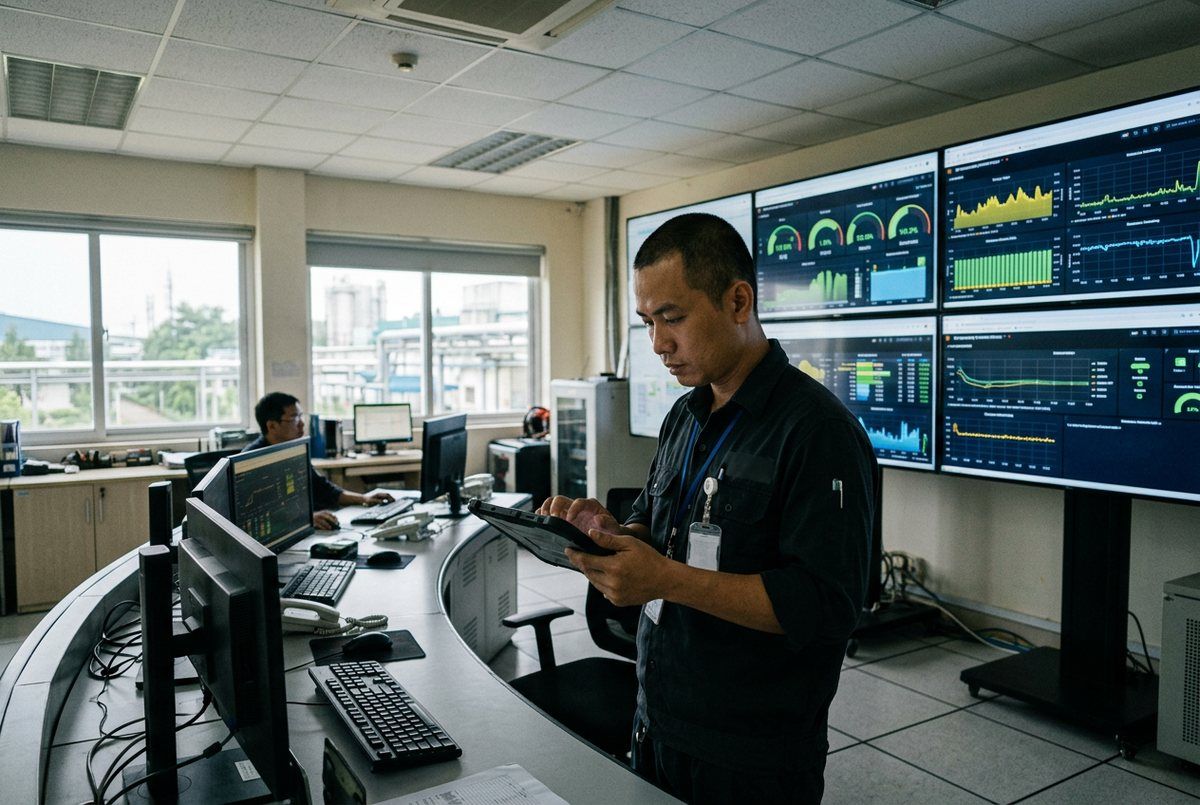
Factory control room monitoring energy and emissions data on screens
What does EcoCheck offer AI agents?
There are two access levels serving two different needs:
| Public MCP | Business account MCP | |
|---|---|---|
| Endpoint | https://ecocheck.ai/mcp | https://ecocheck.ai/mcp/account |
| Sign-in | Not required | Required (OAuth 2.1, EcoCheck sign-in) |
| Data | 2026 regulations, inventory obligation check, services, pricing, articles | Your own company’s workspaces, organizations, facilities, inventory periods and emissions reports |
| Permissions | Read-only | Read-only |
Some representative tools:
- check_ghg_inventory_obligation: checks whether a facility is subject to mandatory inventory under the thresholds of 3,000 tCO₂e / 1,000 TOE / 65,000 tonnes of waste (Decree 06/2022/ND-CP as amended by Decree 119/2025) and the list in Decision 42/2026/QD-TTg.
- get_ghg_regulations: verified 2026 legal milestones (31 March 2027 submission deadline, pilot emission allowances, CBAM 2027).
- list_inventories, list_inventory_years, get_emissions_report: read your company’s inventory periods and total emissions by Scope, source, facility and gas type.
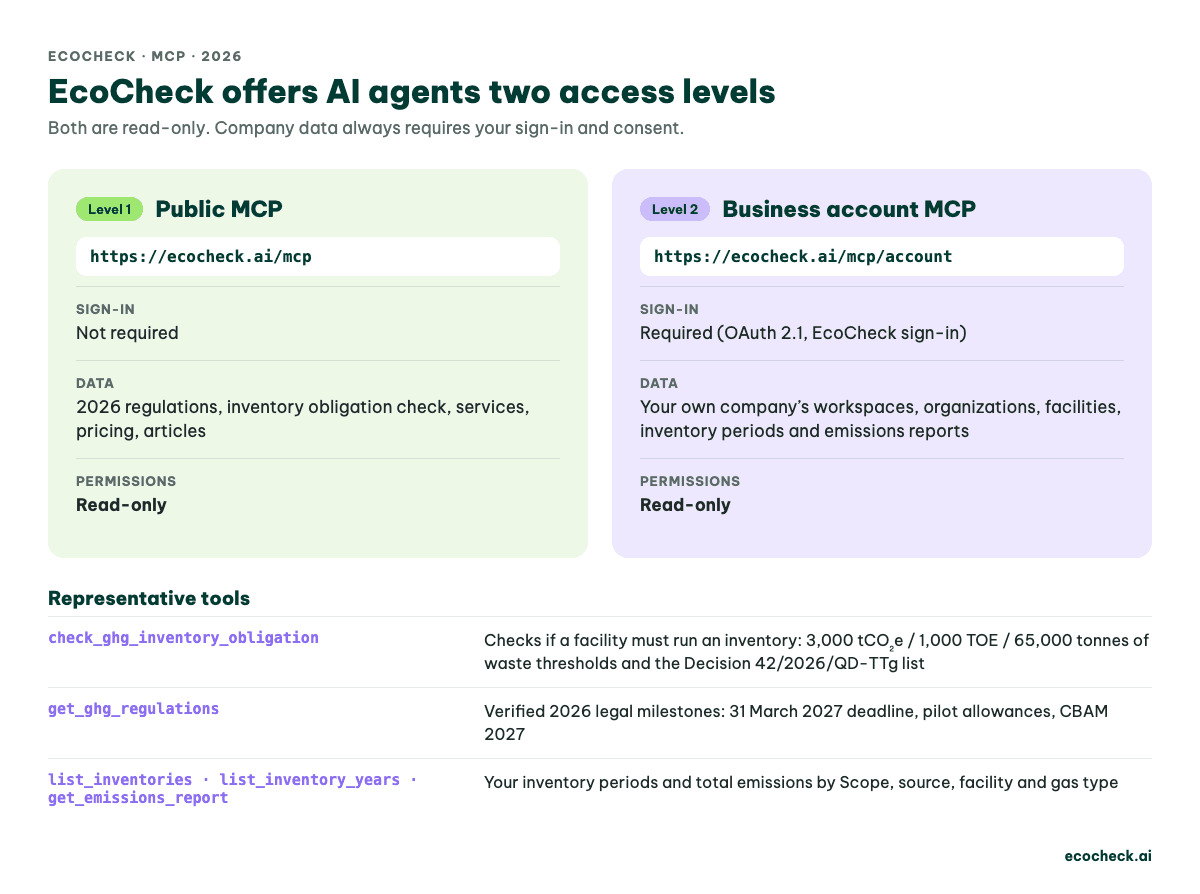
Figure 1: Comparison of EcoCheck's two MCP access levels: public MCP with no sign-in and business account MCP via OAuth 2.1, both read-only
How do I connect EcoCheck to Claude or ChatGPT?
In an MCP-compatible AI app, add a custom connector (MCP server) and paste the corresponding endpoint:
- Open the AI assistant’s connector / MCP settings and choose to add a custom connector.
- Enter
https://ecocheck.ai/mcpfor public information, orhttps://ecocheck.ai/mcp/accountto connect your company data. - For the account connector, the AI app will open the EcoCheck sign-in page. Sign in with your EcoCheck account and approve the
ecocheck/readpermission. - Try asking: “List my company’s inventory periods on EcoCheck” or “What were total emissions in 2025 by Scope?”.
The AI app registers the connection itself via the OAuth standard; you don’t need to create an API key or share your password with the AI. Technical details for developers are available at ecocheck.ai/auth.md and ecocheck.ai/llms.txt.
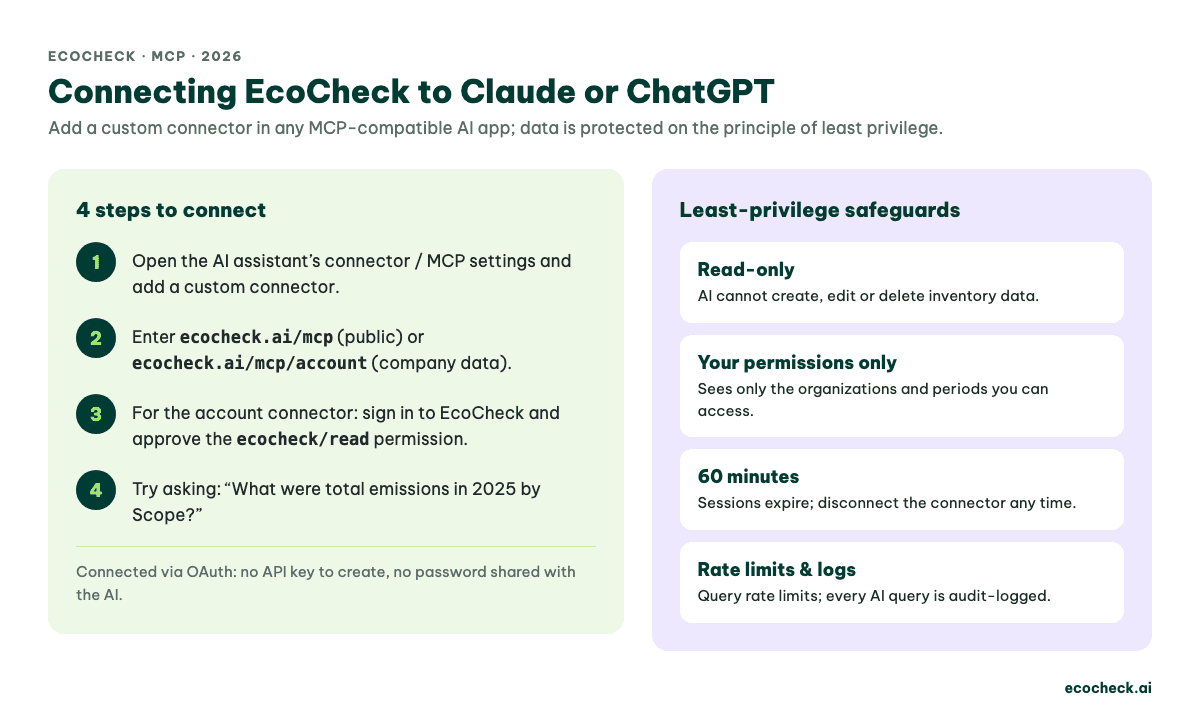
Figure 2: Four steps to connect EcoCheck to Claude or ChatGPT via MCP and four data safeguards: read-only, your permissions only, sessions expire after 60 minutes, rate limits and audit logs
Is my company’s data safe?
EcoCheck designed its AI connection on the principle of least privilege:
- Read-only: the AI cannot create, edit or delete inventory data, and cannot view member lists, evidence files or export documents.
- Your permissions only: the AI uses your own login session, so it sees only the organizations and inventory periods you have been granted access to, nothing more.
- Time-limited and revocable: access sessions expire after 60 minutes, and you can disconnect the connector at any time in the AI app.
- Rate limits and audit logs: each user is subject to query rate limits, and every AI query is recorded in an audit log.
Note: your questions and the answers are processed by the AI provider you choose, under that provider’s data policy. For sensitive data, use an enterprise AI plan that commits to not using your data for training.
How useful are AI agents for greenhouse gas inventory work?
- Faster report preparation: summarize total emissions by Scope, compare across years and pinpoint the largest emission sources.
- Answering internal questions: when leadership asks “Are emissions up or down this year?”, the AI answers with inventoried figures.
- Tracking legal obligations: ask about the 31 March 2027 reporting deadline, CBAM 2027 or emission allowances, with links to the reference documents.
Keep in mind that AI does not replace the inventory and verification process: the figures are only correct when the input activity data is collected and calculated using the right methodology. See our guide to the 2026 greenhouse gas inventory process or EcoCheck’s end-to-end inventory service.
Frequently asked questions
Do I have to pay extra to use the AI connection?
No. The public MCP is free for everyone; the account MCP uses your company’s existing EcoCheck account. Charges for using the AI app (Claude, ChatGPT) are billed by that provider.
Can the AI enter data or edit reports for me?
No. The current connection is read-only. Data entry, calculation and report finalization are still done in the EcoCheck app.
What can I use without an EcoCheck account?
You can still use the public MCP to check inventory obligations, look up 2026 regulations and read articles. To connect your company data, contact EcoCheck to get an account.
How do I disconnect the AI from EcoCheck?
Remove or disconnect the EcoCheck connector in the AI app. Access sessions also expire automatically; to block access immediately, sign out of EcoCheck.
Which apps support MCP connections?
AI assistants and tools that support the MCP standard with remote MCP servers over HTTP, such as Claude and ChatGPT on plans that include custom connectors. Exact features depend on each provider’s service plan.




![Top 5 Công Cụ Tính Toán Phát Thải Khí Nhà Kính [Cập Nhật 2026]](https://cms.ecocheck.ai/uploads/Eco_Check_Top_5_cong_cu_va_phan_mem_ho_tro_kiem_ke_khi_nha_kinh_d9d03bf693.png)
![Phương pháp Kiểm kê Khí nhà kính: GHG Protocol & ISO 14064 [2026]](https://cms.ecocheck.ai/uploads/Cac_phuong_phap_va_tieu_chuan_kiem_ke_khi_nha_kinh_pho_bien_e645f7df80.png)